
The result is predictable.
Nearly 70% of real estate leads are lost due to poor follow-up. Not because the lead wasn’t interested, but because nobody followed up in time, or the lead simply fell through the cracks.
This guide brings together everything you need to fix that: what a lead management system actually is, the step-by-step process to track leads properly, the features worth paying for, the 14 best CRM tools for the Indian market, the mistakes that quietly kill conversion rates, and how to actually implement a system without disrupting your team.
What Is a Real Estate Lead Management System?
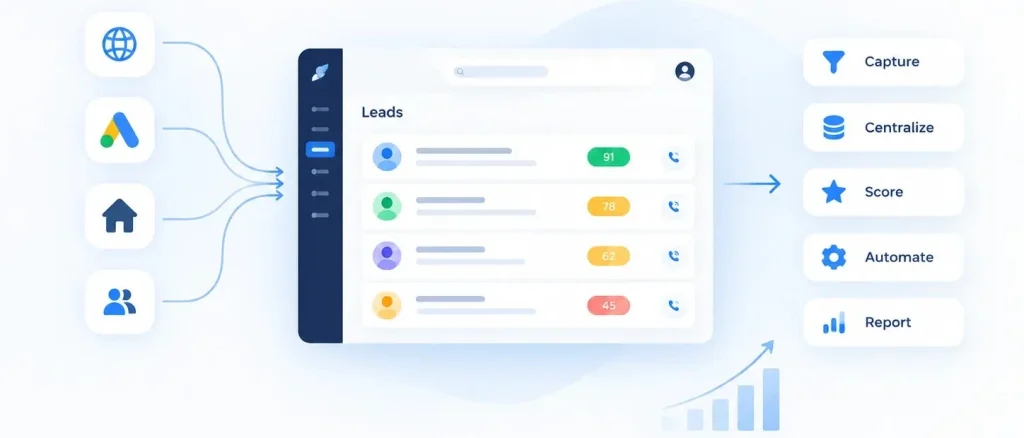
A real estate lead management system is software that replaces the ad hoc way most agencies handle leads — Excel sheets, personal notebooks, and WhatsApp chats scattered across a dozen phones — with a single, centralized workflow.
At its core, a good system does five things:
- Captures leads automatically from every source (portals, website, ads, referrals)
- Centralizes all lead information in one place, visible to the whole team
- Scores lead so agents know who to call first
- Automates follow-ups so no lead goes cold from human forgetfulness
- Reports on what’s working, so you can double down on the channels that convert
Without this, leads live in silos — one agent’s phone, another’s inbox, a manager’s spreadsheet — and nobody has a full picture of the pipeline.
Why Lead Management Matters in Real Estate
Real estate is a timing-driven, relationship-driven business. A buyer who doesn’t hear back within a few hours often assumes you’re not interested — or worse, moves on to a competitor who called first.
The cost of a lost lead isn’t just a missed contact. In real estate, it’s lakhs of rupees in commission walking out the door, often because a lead sat unassigned in an inbox for two days. Multiply that across dozens of leads a month, and poor lead management becomes one of the most expensive (and invisible) problems in the business.
The Challenges of Manual Lead Management
Teams that still manage leads manually tend to run into the same four walls:
Data disarray. Leads come in from ten different sources and end up in ten different places — some in a notebook, some in an inbox, some only in an agent’s memory.
Time-consuming follow-up. Without automation, following up with every lead at the right time becomes a full-time job in itself, and it’s the first thing to slip when things get busy.
Inconsistent communication. Different agents follow up differently (or not at all), so the same lead might get five calls from one agent and zero from another.
Limited scalability. A spreadsheet might work for 20 leads a month. It falls apart completely at 200.
The 7-Step Process to Track Real Estate Leads Through a CRM
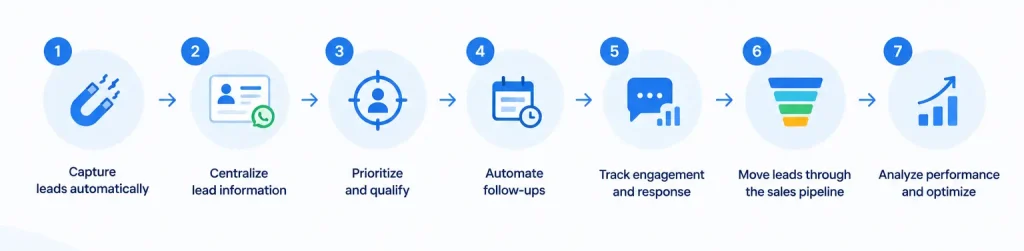
This is the backbone of effective lead tracking — the actual workflow a CRM should enable, from first contact to closed deal.
- Capture leads automatically. Connect your CRM directly to property portals (99acres, MagicBricks, Housing.com), your website, and social/ad campaigns, so no lead requires manual data entry.
- Centralize lead information. Every interaction — call, WhatsApp message, site visit, email — should live on one lead profile, visible to anyone who needs it.
- Prioritize and qualify. Use lead scoring to separate a serious buyer ready to visit a site from someone who filled out a form out of curiosity — and once a lead is qualified, how it gets handed to an agent is its own discipline (see manual vs. automatic lead distribution).
- Automate follow-ups and reminders. Set automatic reminders — a WhatsApp message, an SMS, a call reminder — so leads don’t go cold while agents are busy elsewhere.
- Track engagement and response. Monitor opens, replies, and call pickups to see which leads are actually engaging versus going silent.
- Move leads through the sales pipeline. Track each lead’s stage — new, contacted, site visit scheduled, negotiation, closed — so managers can see exactly where deals stand and who’s responsible for moving them forward (this is where fair lead assignment starts to matter as much as tracking).
- Analyze performance and optimize. Review which sources produce the best leads and which agents convert best, then adjust budget and workflows accordingly.
Key Features to Look For in Lead Management Software
Not all CRMs are built for the Indian real estate market. Here’s what actually matters when evaluating options:
- Portal integrations — direct sync with 99acres, MagicBricks, and Housing.com so leads flow in automatically
- Marketing integration — native connections to Facebook and Google Ads for real-time lead capture
- WhatsApp automation & call tracking — since most Indian buyers still prefer WhatsApp and phone over email
- Lead scoring & pipeline visualization — a clear view of hot vs. cold leads and where each one sits in the funnel; the more sophisticated CRMs extend this into project, language, or budget-based routing rules
- Mobile app support — because agents are in the field, not at a desk
- Channel partner / broker module — to manage leads shared with or sourced from external brokers
- Indian market compatibility — GST-ready invoicing, commission tracking, and BHK/sqft formats built in, not bolted on
- Customization & pricing model — the ability to adapt workflows to your team’s size and process, at a price that scales with you
14 Best Lead Management CRM Software for Real Estate in India (2026)
Here’s the current landscape of tools worth evaluating, ranging from real-estate-specific platforms to general-purpose CRMs with strong real estate use cases:
- Sellxpert — built specifically for Indian real estate, with portal integrations and channel partner management out of the box
- Salesforce — highly customizable, best for larger teams with dedicated CRM admins
- Zoho CRM — strong automation at a lower price point
- HubSpot — user-friendly, good for teams already using HubSpot’s marketing tools
- LeadSquared — built for high lead-volume businesses with strong marketing automation
- Propertybase — real estate-focused, popular with larger brokerages
- RealE360 — India-focused real estate CRM with portal integrations
- Freshsales — solid mid-market option with built-in phone and email
- Bitrix24 — feature-heavy, includes a free tier for smaller teams
- Kylas — India-built CRM with real estate-specific workflows and strong automatic lead distribution
- RealOffice360 — real estate CRM with a focus on channel partner management and rule-based lead routing
- Sell.do — real estate CRM with strong lead distribution and portal sync
- TeleCRM — telecalling-first CRM, useful for high-call-volume teams
- PropertyRadar / equivalent regional tool — worth evaluating based on your specific market and city coverage
When comparing these, weigh them against the feature checklist above rather than price alone — the cheapest tool that doesn’t integrate with your lead sources will cost you more in lost leads than it saves in subscription fees.
Common Lead Management Mistakes to Avoid
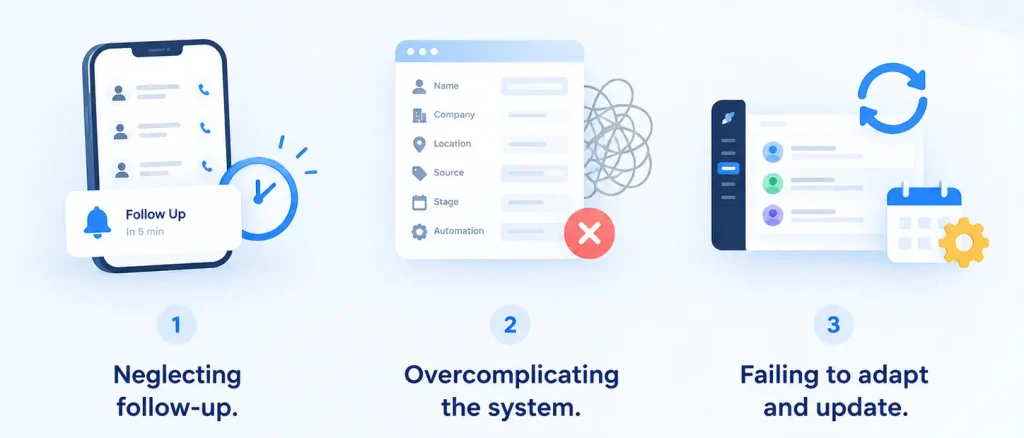
Even with the right software, these mistakes undo most of the benefit:
Neglecting follow-up. A CRM doesn’t call leads on its own — it just makes it easier for agents to do so. Teams that set up automation and then ignore the reminders are back to square one. This is exactly the gap that tiered speed-to-lead SLAs (5/15/30-minute response windows) are designed to close.
Overcomplicating the system. Adding every possible field, stage, and automation rule can make a CRM harder to use than the spreadsheet it replaced. Start simple.
Failing to adapt and update. Lead sources, buyer behavior, and team size change over time. A system configured once and never revisited slowly stops fitting how the business actually works.
How to Choose the Right Lead Management System
Assess your business needs first. How many leads do you get monthly? Where do they come from? What does your current workflow look like, and where does it break down?
Evaluate your options against a feature checklist, not a sales pitch. Ask for a demo or trial and test it with your actual lead sources, not a sample dataset.
Check reviews and ask peers in the industry which tools have actually worked for teams your size — vendor case studies rarely mention the tools that didn’t work out.
Factor in the total cost, not just the sticker price. Look at per-user pricing, hidden costs for integrations or WhatsApp automation, and — most importantly — the ROI: what’s the cost of the leads you’re currently losing versus the cost of the software?
Implementing Your Lead Management System
Rolling out a new system well matters as much as choosing the right one:
- Onboard your team properly — a CRM only works if agents actually use it, so budget real time for training, not just a one-off demo
- Migrate existing data carefully — clean up duplicate and outdated leads before importing, rather than carrying old mess into the new system
- Integrate your lead sources — connect portals, ads, and your website before go-live, not after
- Set up workflows deliberately — define your pipeline stages, scoring rules, and automation triggers based on how your team actually sells, not a generic template
Final Thoughts
Good lead management isn’t about buying the fanciest CRM — it’s about building a system where no lead falls through the cracks, every agent follows up consistently, and you can see exactly what’s working. Get the tracking process and tooling right first, then layer on distribution and speed-to-lead rules once your foundation is solid.
Ready to see it in action? Book a free Sellxpert demo and see how a real estate-built CRM handles capture, tracking, and conversion in one place.